Happy Space - AI Home Design
- 4.8
- Rating
- 10.00K
- Installs
- Free
- Price

 Analysis by App-foxy
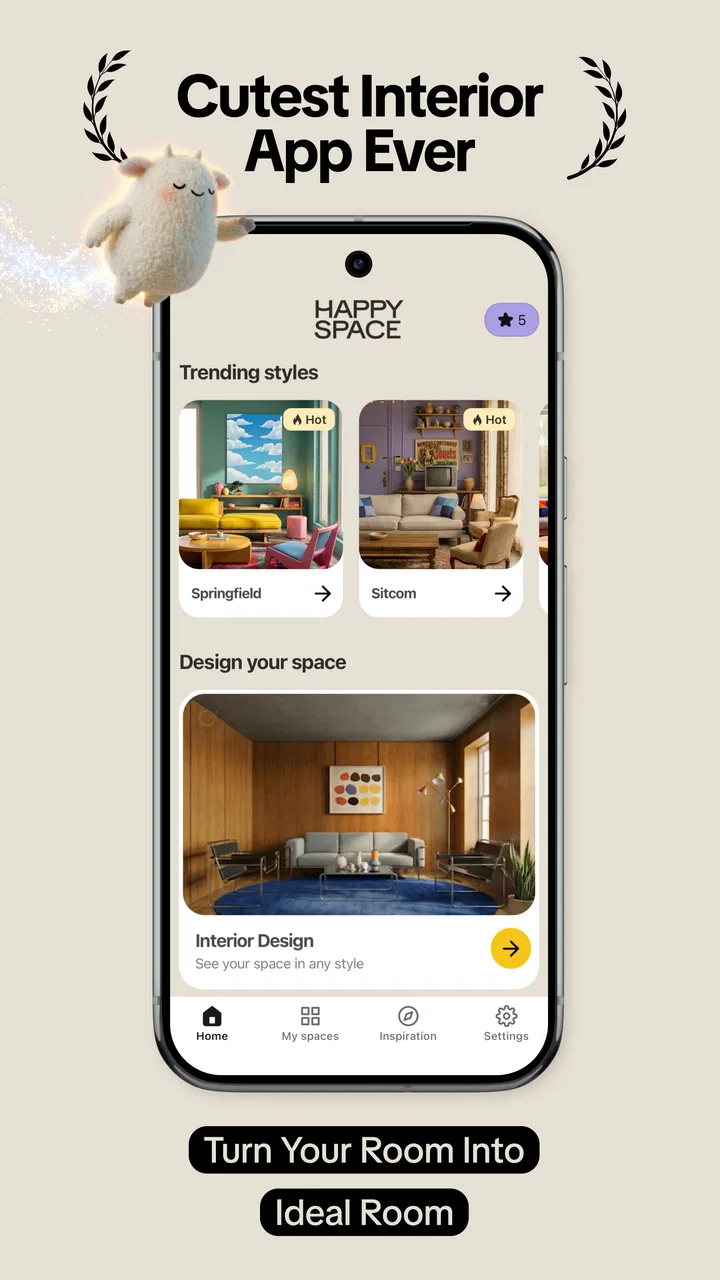
I tried Happy Space - AI Home Design as a quick way to rethink a room without opening a full interior-design program, and its appeal became clear almost immediately: you start with a photo, then use visual restyling to explore different directions for the same space. That makes it less intimidating than building a room from scratch and more useful than scrolling through unrelated inspiration images. If you are wondering whether a warmer light, a cleaner modern look, or a different decorative mood could suit your room, this app gives you a practical place to begin.
It is an Art & Design app from DigiTalya Studios, available free of charge, with optional in-app purchases ranging from $1.99 to $34.99 per item. That distinction matters: you can try the basic experience without paying upfront, but the full value depends on how much of the creative process is available before an optional purchase becomes relevant. I see it as a visual experimentation tool first, not a replacement for an architect, contractor, or detailed furniture-planning service.
Testing a room idea from a real photo
The most useful starting point is an ordinary room photograph. I would take the picture in daylight, keep the camera level, and make sure the main walls and floor are visible. A rushed image with heavy shadows, clutter, or a tilted perspective gives the app less to work with and makes the result harder to judge. This is one of the first practical lessons: the quality of the input photo affects whether the output feels like a helpful design suggestion or merely an attractive visual guess.
You May Also Like

 AccuWeather: Weather Radar
AccuWeather Review: A Quick, Clear Forecast for Everyday Decisions
For everyday plans, the best forecast is the one you can understand quickly. AccuWeather makes rain timing, radar, and local conditions easy to act on, with a few trade-offs.

 Hill Climb Racing
Why Hill Climb Racing Still Turns Crashes Into One More Run
A tiny car, a bumpy hill and one more upgrade: Hill Climb Racing keeps resurfacing because its simple chaos makes every near-miss feel personal.

 AliExpress - Shopping App
AliExpress Makes Global Shopping Feel Personal, but Shoppers Bear the Risk
AliExpress turns a global marketplace into a pocket-sized discovery engine. Its reach is useful, its shopping loop compelling, and its trade-offs easy to miss.

 Lords Mobile: Kingdom Wars
Lords Mobile Is a Kingdom-Building Routine, Not a Quick Match
A case-by-case verdict on the building, battles, device demands, and social commitments that make Lords Mobile rewarding for some players and exhausting for others.

 PDF Scanner app - TapScanner
TapScanner Makes Paperwork Easier to Capture, Check, and Share
TapScanner makes scanning with a phone feel less like a rescue operation and more like a dependable step in getting work done. Its capture tools are useful, though not flawless.

 Block Blast!
Block Blast! Shows How Much a Puzzle Game Can Leave Out
A quiet grid game shows why puzzle players increasingly value instant clarity, repeatable skill and low-pressure play—and where the genre still needs to catch up.
More From Our News Desk
View All News


Once the image is uploaded, the central workflow is straightforward. Instead of manually drawing walls, placing every chair, and adjusting materials one by one, I can explore a restyled interpretation of the existing room. The focus on trending styles, lighting, and related visual changes makes the process approachable for someone who wants ideas but does not already understand design software.
I especially like this photo-first approach for rooms that already exist. It answers a more useful question than “What room looks nice?” It asks, “What might my room look like if I changed its mood?” That difference makes the app relevant to renters, homeowners, students, and anyone preparing to refresh a space without committing to purchases immediately.
There is also a psychological advantage. A blank canvas can be difficult because every decision is open. Starting with a familiar sofa, window, wall, or floor gives me something concrete to compare. Even when the generated direction is not perfect, it can reveal whether I prefer a brighter, calmer, more dramatic, or more contemporary atmosphere.
How I would use it before spending money
My recommended workflow is to photograph the room from the same position before making changes, then save the strongest visual directions for comparison. I would not judge a style from one glance. I would look at the wall treatment, the apparent lighting, the balance of empty and occupied areas, and whether the room still feels usable rather than simply polished.
A useful trick is to test the room with its existing constraints in mind. If the sofa cannot move because of a doorway, or the desk must stay near a power outlet, I would treat the generated image as a mood reference rather than a literal plan. AI restyling can suggest an atmosphere very quickly, but it does not remove the need to check dimensions, circulation, storage, or the position of real fixtures.
For a weekend refresh, I could use the app before visiting a furniture shop. I might photograph a living room, compare a few visual directions, and then shop only for items that support the chosen mood. This is more disciplined than buying isolated pieces because each one looks appealing on its own. The app becomes a filter for decisions, not just a source of pretty images.
Another practical use is discussing ideas with someone else. If two people disagree about whether a room should feel minimal or cozy, a visual restyle can make the conversation more specific. Instead of arguing over vague words such as “modern” or “warm,” we can react to a representation of the actual room. The image may not be a final design, but it gives both people a shared reference.
Where the free starting point fits
The app is free to install and use at the entry level, which lowers the risk of trying it. That is important for casual users who only want to explore a room once or twice. The optional purchases are priced per item, from $1.99 up to $34.99, so I would approach them as a separate value decision rather than assuming that installing the app includes every possible creative option.
For me, the free access is most valuable when I am still deciding whether AI-assisted room visualization suits my way of thinking. If I need only a few ideas before repainting a bedroom, a free trial experience may be enough to guide the next step. If I am repeatedly redesigning several rooms, then the paid options become worth considering only after I understand exactly what extra value they provide in my own workflow.
I would not pay simply because a generated image looks attractive. I would first ask whether it helps me make a real decision: choosing between lighting moods, narrowing a decorating direction, or communicating an idea to another person. The app earns its value when it reduces uncertainty. It is less valuable when I am collecting images without any intention to act on them.
The age rating is Everyone, and the app runs on devices using Android 7.0 or later. That makes it accessible for many people with older Android phones, although the experience will still depend on the camera and general performance of the individual device. A larger screen can also make room comparisons easier, especially when checking small visual details.
What the visual results can and cannot tell me
The strongest benefit is speed. A traditional room-planning application often asks me to learn a library, understand a floor plan, and manually place objects. Happy Space is better suited to an early creative stage, when I want to see several possible moods before investing time in precise planning. It turns an existing photograph into a conversation starter.
That speed comes with an important trade-off. A restyled image should not be treated as a construction document. It can help me imagine color, ambience, and broad style, but I still need a tape measure for furniture, a lighting check for real bulbs, and practical judgment about materials. A design that looks balanced in an image may be awkward around a door or impossible to reproduce because the shown furniture is not the right size.
Lighting deserves special attention. A brighter visual atmosphere can make a room seem larger and more welcoming, but the effect may depend on window direction, existing fixtures, wall color, and the time of day. I would use the app to compare moods, then examine the real room at the times when I normally use it. A living room that looks beautiful in a bright daytime restyle may need a different solution for evening reading or television.
The same caution applies to style labels. A trend can be a useful prompt, but trends are not automatically suitable for every home. I would prioritize the room’s architecture, my maintenance habits, and the furniture I already own. The best result is not necessarily the most fashionable one; it is the one that remains comfortable and realistic after the novelty fades.
How it compares with familiar alternatives
Compared with browsing image boards or social feeds, this app has a clear advantage: it works from my own room rather than showing someone else’s finished space. That makes the inspiration more personal. A beautiful photograph of a luxury apartment may be impossible to translate to a small rental, while a restyled version of my own room immediately exposes which ideas might fit.
Compared with manual interior-design software, it is easier to approach and faster for early exploration. Manual tools are better when I need exact measurements, a reliable floor plan, precise furniture placement, or a shopping-ready layout. I would choose those alternatives for renovation planning and use Happy Space before them, during the stage when I am deciding what direction deserves detailed work.
Compared with hiring a professional designer, the app is obviously more immediate and less personal. A designer can ask about routines, storage, budget, accessibility, and long-term needs. The app cannot replace that conversation. Its role is closer to a visual sketchbook that helps me arrive at a clearer brief before seeking expert advice.
Compared with simply rearranging furniture in person, it saves effort when I want to test a broad visual change without moving heavy objects. It is not as trustworthy for judging physical comfort or scale, though. I would still sit in the chairs, walk through the room, and check whether the proposed arrangement supports everyday life.
Small workflow choices that improve the experience
First, I would create a small set of consistent photos rather than uploading random angles. Keeping the camera position similar makes comparisons more meaningful. If one image is dark and another is bright, I might mistake a lighting difference for a style improvement.
Second, I would remove temporary clutter but leave important fixed elements visible. Hiding every object can produce a cleaner image, yet it also removes the very constraints that make the room difficult. Keeping a radiator, doorway, built-in shelf, or unusual corner in view helps me remember what must work in real life.
Third, I would separate inspiration from purchasing. After choosing a direction, I would write down the changes that matter most, such as wall color, lamp warmth, textile texture, or the amount of visual storage. This prevents the common mistake of trying to reproduce every visible detail at once. The app is more useful when it helps identify priorities.
Fourth, I would compare a dramatic option with a restrained one. A bold restyle can reveal what I like about a trend, while a quieter version may be easier to maintain and cheaper to achieve. That comparison turns the app into a decision tool rather than a machine for generating unrealistic wish lists.
Who will get the most from it
I think Happy Space suits people who make decisions visually. If paint names, furniture catalogs, and written descriptions leave you uncertain, seeing a familiar room reinterpreted can make the choice much easier. It is also useful for anyone who wants to refresh a space gradually and needs help deciding which change should come first.
Renters may appreciate it because it can support reversible ideas such as lighting mood, textiles, layout inspiration, and decorative direction. Homeowners planning a larger update can use it to compare concepts before contacting a professional or buying materials. Students and first-time decorators may find the photo-based approach less overwhelming than a technical planning tool.
It is less suitable for someone who needs exact dimensions, a bill of materials, structural advice, or guaranteed product matching. I would also skip it if my main goal is to manage a detailed renovation from start to finish. In that situation, a measured floor-plan tool, a furniture-planning application, or professional guidance would be a better primary choice.
Users who dislike experimentation may not see enough value either. The app is built around trying visual possibilities, so its benefit grows when I am willing to compare alternatives instead of expecting one perfect answer. It is not a button that discovers my ideal room without judgment; I still need to decide what feels right and what is practical.
My verdict on value and the decision to keep it
DigiTalya Studios has made a focused Art & Design app for the moment before a decorating decision becomes a purchase. Its average rating is 4.8 from around 160 ratings, and it has passed 10 thousand installs, which suggests that the simple photo-to-idea concept is connecting with a meaningful audience. The current version is 1.10.0, and the product’s strongest identity remains clear: use an existing room as the starting point for visual exploration.
I would keep it installed if I were planning a room refresh, comparing lighting moods, or trying to explain a design idea to another person. The free entry point makes experimentation easy, while the optional purchases mean I would evaluate paid value carefully and only spend when the added creative access solves a specific problem for me.
My recommendation is to try it as a design sketchbook, not as a final planning authority. It delivers the most value when I use its images to narrow choices, test atmosphere, and avoid impulsive purchases. I would skip paying if I only want a one-time burst of inspiration, and I would choose a more technical alternative when accuracy, measurements, or construction decisions matter.
In short, this is a friendly tool for turning “I want my room to feel different” into something I can actually see. It does not eliminate the practical work of decorating, but it can make the first and often hardest step—choosing a direction—much less abstract.
FAQs for Happy Space - AI Home Design
01What is Happy Space - AI Home Design?
Happy Space - AI Home Design is an interior design app that uses artificial intelligence to transform photos of rooms into redesigned spaces. After uploading an image, users can explore different styles, color schemes, furniture arrangements, and decorative ideas. It is intended for inspiration and planning rather than replacing professional architectural, construction, or interior design advice.
02How does the AI room redesign feature work?
The process is generally simple: take or upload a clear photo of a bedroom, living room, kitchen, office, or another space, then select a preferred design style or customization option. The app analyzes the room and generates a visual concept. Results can vary depending on lighting, image quality, room shape, and how much of the space is visible in the photograph.
03Is Happy Space - AI Home Design free to use?
The app may offer free access to some design tools or a limited number of AI-generated results, while additional styles, generations, exports, or advanced features can require payment. Availability and pricing may differ between Android and iOS and can change over time. Before starting a trial or subscription, carefully review the in-app purchase screen, renewal terms, and cancellation instructions.
04Can the designs be used for real home renovations?
The generated designs can be useful for collecting ideas, comparing decorating styles, and communicating a general vision to a contractor or designer. However, the images should not be treated as exact renovation plans. AI suggestions may show furniture that does not fit, inaccurate dimensions, impractical layouts, or materials that are unavailable. Always verify measurements, structural requirements, electrical work, and costs independently.
05What should I know about privacy when uploading room photos?
Because the app processes photographs of your home, it is important to check its privacy policy before uploading personal images. Avoid including people, documents, addresses, valuables, or other sensitive information in room photos. Review what data may be stored, how images are processed, whether they are shared with service providers, and how you can delete your account or submitted content.
Pros
- Generates multiple room concepts quickly from a single photo.
- Supports several interior styles for varied design inspiration.
- Useful for visualizing renovations before buying furniture or decor.
- Simple interface makes experimentation accessible to non-designers.
- Can spark creative ideas when planning color and layout changes.
Cons
- AI results may distort room proportions
- windows
- or existing furniture.
- Some advanced designs or features may require a subscription.
- Output quality depends heavily on photo lighting and camera angle.
- Generated images may include impractical or unavailable furniture pieces.
- Privacy terms should be checked before uploading photos of your home.

Happy Space - AI Home Design
Gallery